- Joined:
- Dec 27, 2017
- Messages:
- 128
- Points:
- 37
- Awards
- 2


8
Years of Mono
LV
0
Intro:
Have you ever been watching a different player's medal clip, and happen to notice that their hands have different gloves than yours? You can do this too! Here's how!
Method 1: Addons
This is the easiest way to get gloves, however the least customizable, as there is a limited selection.
Step 1:
Open the Steam Workshop by opening the Steam application, hovering over "Community" and selecting workshop from the drop-down.
Step 2
Select or search for the Garry's Mod workshop, there should be a bar to search on the right-hand side.
Step 3
Searching the word "Gloves" will generally get you where you'd like to go. Killdrix's Hands Collection has many options for pre-made gloves to choose from, all you need to do is search for the ones you like, and click "Subscribe!"
Method 2: Manual Installation
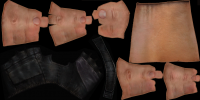
If you happen to have some talent in programs such as paint, photoshop, or gimp, you can actually create your own gloves. Attached to this guide are templates showing what the default gloves look like in their unwrapped form.
Step 1
Create your gloves, following the templates below, and save them as .png files.
Step 2
You will need to use VTFEdit for this next step. Open the program, and under "File" select import.
Step 3
Once you import your .png file, you'll get a menu with many options. These can be adjusted to your liking, feel free to experiment. Once set to your liking, click "File" and then save.
Step 4
The file path you need to save under is -
C:\Program Files (x86)\Steam\steamapps\common\GarrysMod\garrysmod\materials\models\weapons\v_models\hands
Name the file "v_hands.vtf."
**NOTE: The file path above may not already exist, if this is the case, just create new folders and name them accordingly.**
Step 5
Once the file is saved in the correct directory, go back to VTFEdit. Under "Tools" select "Create VMT File," then click "Create." Name this file "v_hands.vmt."
Now all you need to do is start the game!
Have you ever been watching a different player's medal clip, and happen to notice that their hands have different gloves than yours? You can do this too! Here's how!
Method 1: Addons
This is the easiest way to get gloves, however the least customizable, as there is a limited selection.
Step 1:
Open the Steam Workshop by opening the Steam application, hovering over "Community" and selecting workshop from the drop-down.
Step 2
Select or search for the Garry's Mod workshop, there should be a bar to search on the right-hand side.
Step 3
Searching the word "Gloves" will generally get you where you'd like to go. Killdrix's Hands Collection has many options for pre-made gloves to choose from, all you need to do is search for the ones you like, and click "Subscribe!"
Method 2: Manual Installation
If you happen to have some talent in programs such as paint, photoshop, or gimp, you can actually create your own gloves. Attached to this guide are templates showing what the default gloves look like in their unwrapped form.
Step 1
Create your gloves, following the templates below, and save them as .png files.
Step 2
You will need to use VTFEdit for this next step. Open the program, and under "File" select import.
Step 3
Once you import your .png file, you'll get a menu with many options. These can be adjusted to your liking, feel free to experiment. Once set to your liking, click "File" and then save.
Step 4
The file path you need to save under is -
C:\Program Files (x86)\Steam\steamapps\common\GarrysMod\garrysmod\materials\models\weapons\v_models\hands
Name the file "v_hands.vtf."
**NOTE: The file path above may not already exist, if this is the case, just create new folders and name them accordingly.**
Step 5
Once the file is saved in the correct directory, go back to VTFEdit. Under "Tools" select "Create VMT File," then click "Create." Name this file "v_hands.vmt."
Now all you need to do is start the game!